News (click to select category)
Guidelines for the Use of LJZ-500D High Strength Bolt Tester
Date:2025-12-15ID: 274Heat:
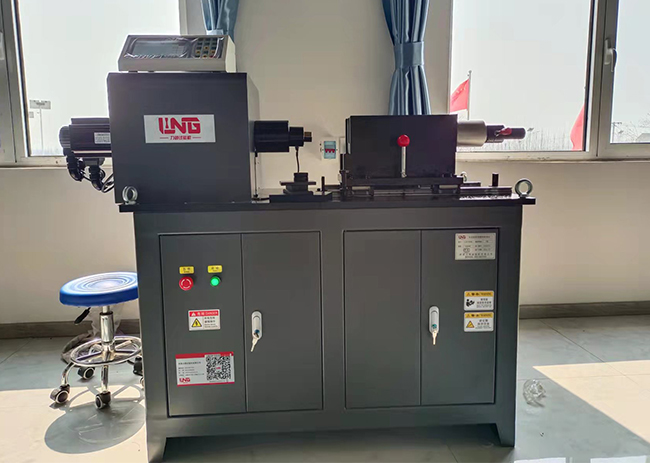
1. Connect the data cable and power cable: Connect the corresponding torque sensor, axial sensor, and motor serial port respectively, and turn on the power.
2. Select the corresponding inner baffle, outer baffle, and anti rotation card according to the specifications of the bolts. Adjust the front and rear positions of the moving tension seat according to the length of the bolt pair, and install the high-strength bolt connection pair, bolt sleeve, torque sensor, and force reducer.
3. Turn on the power switch of the testing instrument, set the correct test parameters in the test parameter interface, click the "OK" button to return to the test interface, adjust the required speed, and then reset the current axial force and torque values (before resetting, the torque sensor and axial sensor are actually powerless). Slightly tighten the nut with a handle at the axial sensor, press the "Start" button, and start slowly and uniformly loading in a clockwise direction. When the axial force value reaches the standard requirement value, the equipment will automatically alarm. At this time, the loading should be stopped immediately, and the equipment will automatically save the test data. Apply reverse force to loosen the bolt pair and proceed to the next test (select "Yes" in the parameter settings to automatically return to the standard requirement when the axial force value reaches the standard requirement). At this time, the device automatically returns to loosen the bolt pair. After sequentially testing the 8 sets of bolt pairs (note: the axial force and torque values must be reset to zero before each test), press the "Results" button to automatically calculate the average axial force, average torque, average torque coefficient, standard deviation, and coefficient of variation of the 8 sets of bolt pairs.
4. Processing and printing of test results:
On the test interface, after the test is completed, press the "Results" button to process the test results.
On the test result interface, press the "Print" button to print the current page of test results.
Z: It refers to the average value of data.
δ: It refers to the standard deviation of data.
C: It refers to the coefficient of variation (%) of the data.
When testing the torsional shear type high-strength bolt pair, the test results only display and print the tightening axial force value, average axial force value, and standard deviation.
2. Select the corresponding inner baffle, outer baffle, and anti rotation card according to the specifications of the bolts. Adjust the front and rear positions of the moving tension seat according to the length of the bolt pair, and install the high-strength bolt connection pair, bolt sleeve, torque sensor, and force reducer.
3. Turn on the power switch of the testing instrument, set the correct test parameters in the test parameter interface, click the "OK" button to return to the test interface, adjust the required speed, and then reset the current axial force and torque values (before resetting, the torque sensor and axial sensor are actually powerless). Slightly tighten the nut with a handle at the axial sensor, press the "Start" button, and start slowly and uniformly loading in a clockwise direction. When the axial force value reaches the standard requirement value, the equipment will automatically alarm. At this time, the loading should be stopped immediately, and the equipment will automatically save the test data. Apply reverse force to loosen the bolt pair and proceed to the next test (select "Yes" in the parameter settings to automatically return to the standard requirement when the axial force value reaches the standard requirement). At this time, the device automatically returns to loosen the bolt pair. After sequentially testing the 8 sets of bolt pairs (note: the axial force and torque values must be reset to zero before each test), press the "Results" button to automatically calculate the average axial force, average torque, average torque coefficient, standard deviation, and coefficient of variation of the 8 sets of bolt pairs.
4. Processing and printing of test results:
On the test interface, after the test is completed, press the "Results" button to process the test results.
On the test result interface, press the "Print" button to print the current page of test results.
Z: It refers to the average value of data.
δ: It refers to the standard deviation of data.
C: It refers to the coefficient of variation (%) of the data.
When testing the torsional shear type high-strength bolt pair, the test results only display and print the tightening axial force value, average axial force value, and standard deviation.
About LiLing
Product range
News
Contact LiLing
National Service Hotline:+8618660398828
Address:山东省济南市市中区魏华西路6号院内2号厂房


Business consultation (WeChat)
Technical Support: ChaoYueHuLian
Links: